Invite staff and control what they can see
Use roles to separate customer care, settings and financial access.
- 1
Review roles before inviting
Open Settings → Roles. Choose a built-in role or create a custom role with the required permissions. Do not give Admin simply because someone handles tickets; administrative access is broader than customer support.
- 2
Configure a customer-care role
Allow the inbox, customer/order details and ticket or return operations needed for the job. Leave dashboard, revenue, billing and settings permissions off unless required. Viewing an order to support a customer and viewing financial reports are different permissions. Test the role with a separate staff login.
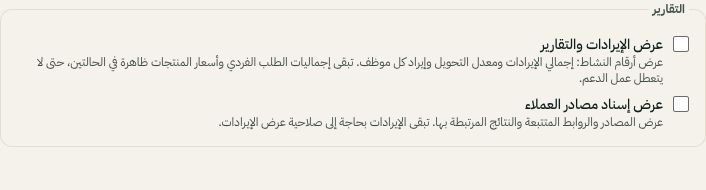
Financial and revenue-attribution access are separate role permissions. Arabic interface shown; use the corresponding labels in your chosen language. Your available options and saved values may differ. Open the image to enlarge. - 3
Send the invitation and assign the role
In Settings → Team, invite the teammate by email and select the intended role. Check the available seats shown for your subscription. The teammate accepts the invitation into this workspace; verify their access rather than sharing the owner's account.
- 4
Review each teammate’s recorded work
Open Settings → Team → Your team’s work. Choose dates in Riyadh time to see sent replies, conversations answered/resolved, tickets worked/resolved and estimated active app time, then export CSV. Manage team permission is required; financial access is separate. Replies exclude bots, notes and failed sends. Activity measures use inside Moyafa, not attendance. Current assigned work is shown separately. Accurate conversation resolution attribution starts when tracking was enabled; older closures are not guessed. iOS 2.0.2 adds the same report, export and activity recording.
- 5
Maintain access and assignment
Review roles when responsibilities change. Departments and assignment rules organize work but do not replace permission checks. Remove access when a teammate leaves, and transfer open work to an active team member.