Create, assign and resolve tickets
Handle support and return cases, review customer history and keep each case owned.
- 1
Know what opens a ticket
Staff can create tickets manually from the available ticket/conversation actions. A submitted Moyafa return form creates a return case. A general question about return policy or order status should be answered without automatically opening a ticket. AI handoff to staff is separate from ticket creation.
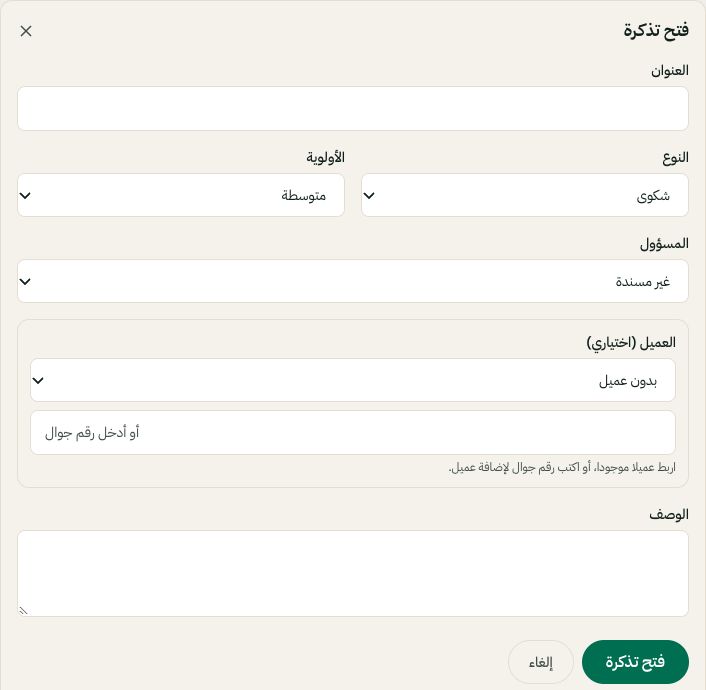
New ticket: choose the category, priority, owner and customer. Arabic interface shown; use the corresponding labels in your chosen language. Your available options and saved values may differ. Open the image to enlarge. - 2
Choose an owner, priority and status
Open the ticket, read the customer report and linked conversation, assign it to a teammate or yourself, and set a realistic priority and due date where available. Use the status matching its real stage; waiting on someone is different from resolved.
- 3
Review return and warranty history
In the customer return/warranty history section, inspect prior cases and completed warranty claims before granting another benefit. History covers recorded and imported cases, not unknown claims outside Moyafa. Compare the original item and requested replacement, quantities and evidence in the case details.
- 4
Approve operations deliberately
Approval, pickup booking, replacement dispatch and refund recording are separate actions. Confirm the actual order, items, address and amount before each action. Check an uncertain existing shipment instead of creating a duplicate. Close the case after the work is complete and keep the evidence in its record.