Skip to content
moyafa
HomeProductFeaturesPricingIntegrationsHelp
عربيLog inSign up now
العربية
Moyafa is a Meta-approved Tech ProviderMeta Tech Provider
Back to help center

Connect WhatsApp

Connect your own WhatsApp Business number through Meta — you pay Meta directly, with no markup from us.

  1. 1

    Open Settings → WhatsApp

    Click «Connect WhatsApp» and confirm your number with Meta in the guided sign-up. Moyafa is a Meta Tech Provider, so there's no markup on messages. Only an owner or admin can connect.
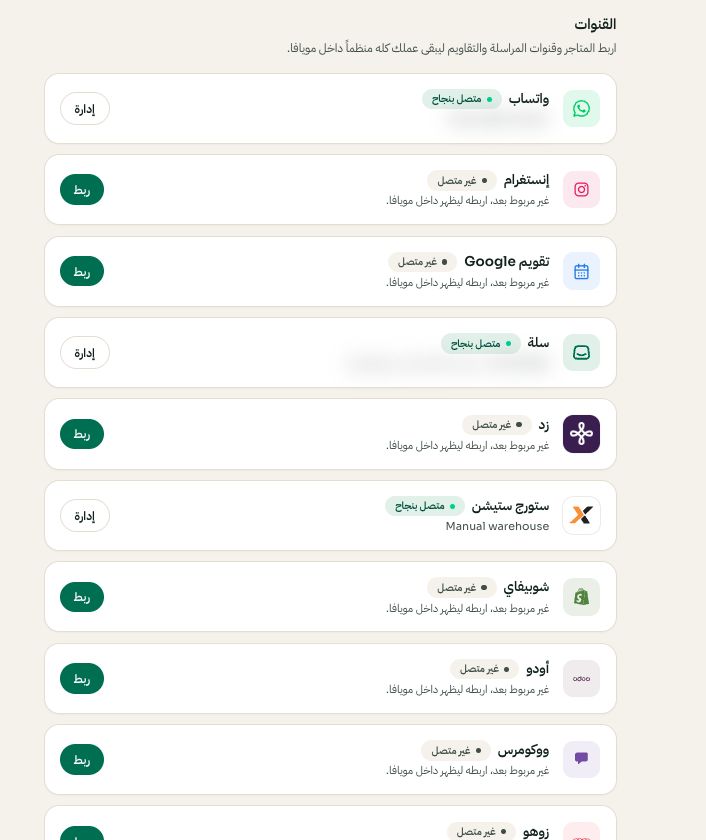
    Settings → Channels: choose the platform, then Connect or Manage
    Settings → Channels: choose the platform, then Connect or Manage. Arabic interface shown; use the corresponding labels in your chosen language. Your available options and saved values may differ. Open the image to enlarge.
  2. 2

    Send a test message

    Use the test card to send yourself a message and confirm the connection works end to end.

  3. 3

    Add more numbers if you need them

    You can connect more than one number and mark one as primary. Campaigns and the AI assistant let you pick which number to work from.

Still need help?

Tell us what you are trying to do and where you got stuck. Do not include passwords, verification codes or private customer details.

Contact us on WhatsAppEmail support
moyafa

Your team’s WhatsApp, customer orders and business appointments in one place. Reply, follow up and get the work done with Moyafa.

Operated by Three Lines Company Ltd (KSA)

Download for iPhoneGet it on Google Play

Product

FeaturesPricingIntegrationsProductHelp center

Legal

Privacy PolicyTerms of Service

Contact

support@moyafa.comMessage us on WhatsApp

© 2026 Moyafa. All rights reserved.

العربية
Talk to the Moyafa teamOn WhatsApp