Configure and monitor cart recovery
Choose templates, delay and reminder limits, then monitor eligible carts and recorded purchases.
- 1
Connect the store and approve a reminder template
The connected platform must supply abandoned-cart data and a usable customer phone. Create the intended reminder template, submit to Meta and refresh its status. Cart availability and supported recovery settings depend on the connected platform.
- 2
Open Cart recovery in Message templates
Select the approved template and language, set the delay and reminder count using the limits shown, then review any later reminder or incentive settings available for your store. Enable and save after checking the message preview.
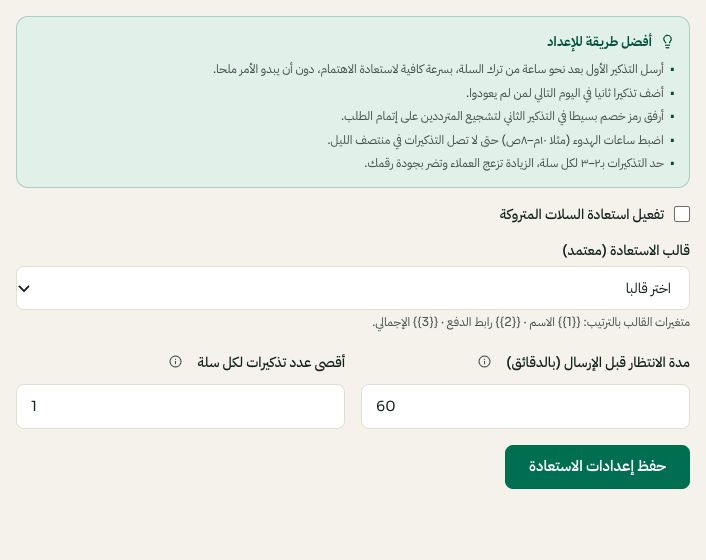
Example Shopify recovery controls: template, delay and reminder limit. Arabic interface shown; use the corresponding labels in your chosen language. Your available options and saved values may differ. Open the image to enlarge. - 3
Review eligible carts before manual sends
Open Cart recovery to inspect actual carts and their reminder history. Manual sends still check customer eligibility, consent and reminder limits. Use a controlled cart for testing; do not repeatedly remind the same customer to diagnose a connection issue.
- 4
Read outcomes carefully
A purchase recorded after a reminder is an attributed recovery, not proof that the reminder alone caused the sale. Missing store events can leave results incomplete. If sends stop, check templates, connection state, eligibility and scheduling before changing the audience.